
 Login
Login Frequently Asked Questions

 Is it possible to create a grid in Field-Map?
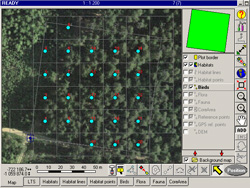
For point sampling, Field-Map can generate a user-defined regular grid of points within plot boundaries.
At these grid points, you can easily create concentric circles that can be used for detailed measurements and mapping.
Field-Map also allows you to optimize the placement of user-defined circles inside polygons. Line and polygon grids can be created as well.
Field-Map also allows you to optimize the placement of user-defined circles inside polygons. Line and polygon grids can be created as well.
How does Field-Map compare with other field data collection approaches?
Using Field-Map significantly increases productivity. As a general rule, the larger the plot and the more complex
the field methodology, the greater the benefits of using Field-Map.
Compared with traditional methods based on standard equipment and paper forms, Field-Map offers clear advantages.
Even compared with custom software applications developed for individual projects, Field-Map provides a substantial
efficiency gain. With Field-Map, it is efficient to develop applications even for a single research plot.
Moreover, Field-Map does not require qualified programmers to develop field applications.
This means your investment in Field-Map pays off in a very short time.
This means your investment in Field-Map pays off in a very short time.
What is the difference between digitizing existing maps and mapping with Field-Map?
Data collected with Field-Map are stored in a ready-to-use GIS format (ESRI Shapefiles). Therefore, no conversion or export is required.
Compared with conventional digitizing of hard-copy maps, Field-Map provides precise and up-to-date information,
free from digitizing errors and available immediately after returning from the field.
Field-Map is not intended for GIS-based data evaluation; it is a sophisticated and comprehensive tool for data acquisition.
Field-Map is not intended for GIS-based data evaluation; it is a sophisticated and comprehensive tool for data acquisition.
How difficult is it to learn Field-Map?
Despite its comprehensive functionality, Field-Map is still user-friendly.
The MS Windows environment makes the software easy to understand for typical computer users.
Field-Map makes modern measurement technology accessible even to non-specialists.
Available technical support and training programs help you get started quickly and efficiently.
Can Field-Map functionality be expanded?
Field-Map has a modular architecture. Within the common user interface, multiple modules can be used to meet specific needs.
In addition, external user modules can be developed as dynamic libraries (DLLs) using tools such as C++, Delphi, etc.,
and executed from within Field-Map. For example, volume tables, biomass equations, growth and yield models,
assortment tables, and other extensions can be integrated.
What data formats does Field-Map use?

The internal structure of the Field-Map database is based on Firebird, MS Access, PostgreSQL or MS SQL tables for storing attributes and ArcView Shapefiles or WKB (well-known binary format)
for storing geographic entities. Attribute tables can be exported to MS Access or MS Excel format using the export utility in Project Manager or Data Collector.
How can the collected data be used?
Connectivity to external devices in the field and easy transfer of data to external applications are key Field-Map capabilities.
Firebird, MS Access, PostgreSQL or MS SQL formats of attribute tables allow you to use Field-Map data in a wide range of desktop applications for statistical processing, data visualization, and more.
The ArcView Shapefile or WKB format of geographic layers enables the use of Field-Map data in other GIS software (ArcView, Arc/Info, MapInfo, QGIS, etc.) without any additional conversion.
Firebird, MS Access, PostgreSQL or MS SQL formats of attribute tables allow you to use Field-Map data in a wide range of desktop applications for statistical processing, data visualization, and more.
The ArcView Shapefile or WKB format of geographic layers enables the use of Field-Map data in other GIS software (ArcView, Arc/Info, MapInfo, QGIS, etc.) without any additional conversion.
How can a remote sensing specialist benefit from using Field-Map?
Most remote sensing projects require ground truth data to validate analysis methods.
In Field-Map, you can use georeferenced raster images as background maps and collect data for multiple layers.
What is the advantage of Field-Map compared with land surveying technologies?
In traditional surveying, you typically collect a set of coordinates in the field using a total station and then create the map in the office.
If an error is discovered later, you often need to return to the field to correct the measurements.
With Field-Map, you create and edit the map directly in the field, which helps avoid such issues. While the precision is not at the millimeter level, the speed of data collection is incomparable.
With Field-Map, you create and edit the map directly in the field, which helps avoid such issues. While the precision is not at the millimeter level, the speed of data collection is incomparable.