 Login
Login Field-Map Data Collector (FMDC)
Having database structure ready you can start the fieldwork immediately.
User interface is automatically adjusted according to the project structure.
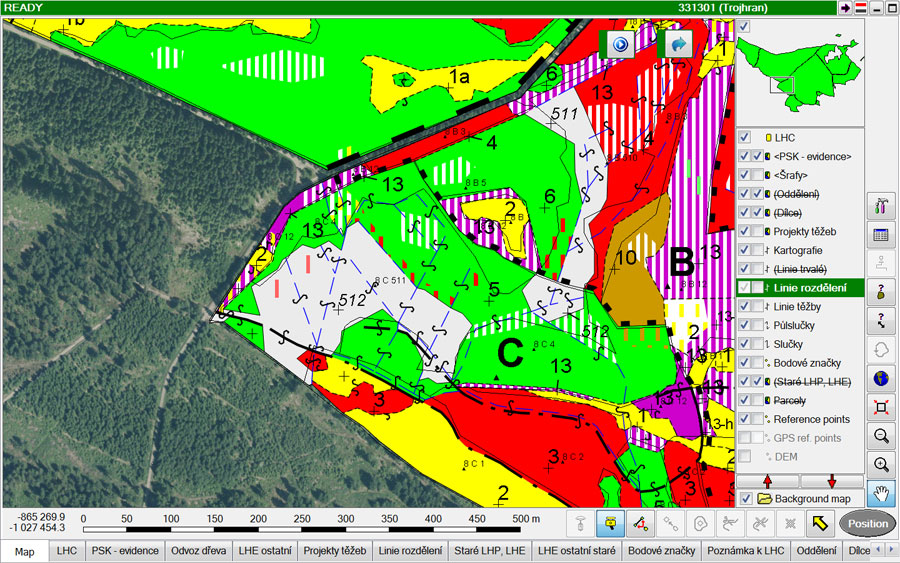
FMDC directly supports field electronic measurement devices (GPS, laser rangefinder, electronic inclinometer, electronic compass and electronic caliper) and gives the user the possibility to map and measure in the field. The basic principle is very simple: the user gets the position (using GPS, map or local co-ordinate system) and using measurement devices it records position and dimensions of trees.
General mapping functionality enables mapping of points, lines and polygons.

Special GIS features are used for trees, deadwood and transects. Each entity can be described by attributes.
FMDC has extensive functionality to increase productivity of fieldwork. Continuous georeferencing gives the user possibility of free movement within a plot, number of different methods of tree height measurement simplify work in harsh conditions, etc. After collecting data, the user can immediately verify it, by using visualization and validity checking routines.
Detail list of FMDC features
-
Mapping
FMDC is used for mapping basic GIS entities (points, lines and polygons) and also special forestry entities (e.g. trees, deadwood, transect). The mapping can be done using GPS, laser rangefinder and compass electronic tachymeter, drawing by pen on tablet computer or typing the data from keyboard.
-
Importing digital maps and data
Supported formats are ESRI Shapefiles, ArcInfo Coverages, Digital Exchange Format, MSAccess, DBase, MSExcel, Paradox and XML.
-
Detail tree measurement
You can measure horizontal crown projections, vertical crown profiles and stem profiles. Everything is instantly drawn on the screen of the field computer and volumes are automatically calculated.
-
Mapping of deadwood
Deadwood lying on the ground can be mapped and described by sections. Volume of the deadwood is calculated automatically.
-
Building polygons from lines
Create topological or non-topological polygons from mapped lines.
-
Navigation in the field
Use GPS or compass and laser rangefinder to navigate in the field. The combination of laser rangefinder and electronic compass is especially useful under dense canopy.
-
Checking the data
Check missing or incomplete data. Define what is an error and what is not.